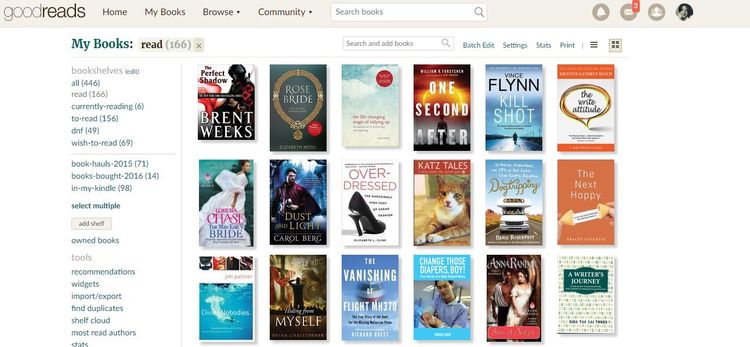
Ever bought an extra copy of a book you already have by accident? I did that way too often, which is why I started using Goodreads to organise my books.
I am usually not one for digital apps. Evernote confuses the hell out of me, and my super low-tech bullet journal is my go-to organising method. But Goodreads’ app makes it so easy to record what I read, books that I’ve bought and post book reviews that it was a no-brainer to use it. Plus, it has helped me cut down my TBR pile massively!
My Goodreads system is simple and geared towards curbing my impulsive book-buying habit. (Believe it or not, I used to spend RM500 a month on books!) The “currently reading”, “to read” and “read” shelves are pretty self-explanatory, but I created these shelves to help me have a “minimalist reading lifestyle”:
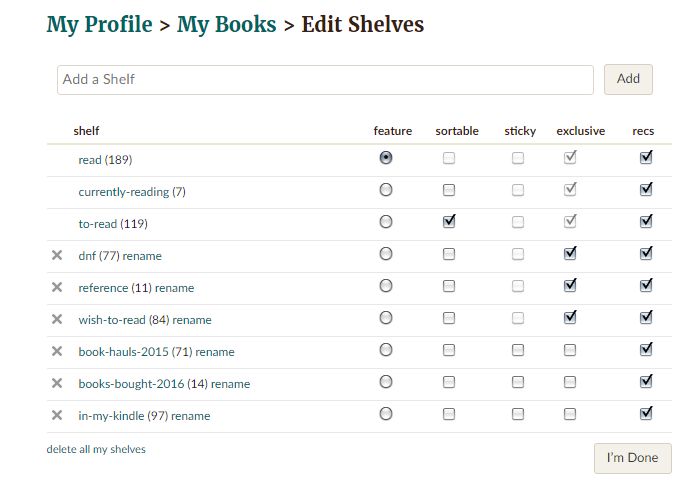
DNF shelf
Goodreads does not have a Did Not Finish shelf, so I had to create one myself. What? Not finish a book? The horrors! (I blogged about the reason why I now DNF books recently.) I will study this list to see the type of books I usually DNF and remind myself not to waste time on certain genres and authors next time. For example, I DNfed most of the romance and YA novels I bought at cheap sales, so I’ll avoid buying them in the future. Also, all those free Kindle novels? DNFed. I won’t bother with those either.
Reference
I’m in no hurry to finish the books in this shelf, so rather than place them in my TBR shelf (in this case, the To Read shelf) which will cause me mental stress, I place them in their own shelf. These books are books I use for my work, such as dictionaries, grammar books or fiction writing guides.
Wish to read
To control my impulse buying, I’d plonk books that catch my interest here. If I’m still interested in it weeks later, I’ll consider buying it. (I usually end up NOT buying them!)
Book hauls 2016
I record books I bought for they year in this section. It’s not an exclusive shelf (meaning the title can also appear in other categories). This is a handy way to track the number of books I bought in a year. As you can see, after using Goodreads to pare down my TBR the number of books I’ve bought this year fell quite a bit. Yay, me!
In My Kindle
Because e-books are not physical, I tend to forget I even have them. I’ll plonk an ebook title in this shelf once I buy it. However, I do admit that I often forget to do so because I have to do it manually. As mine’s an old model Kindle, it doesn’t appear to have Goodreads integration.
EDIT: I’ve now added “library & borrowed” and “netgalley” shelves. Ever since I joined the Kuala Lumpur Book Appreciation Group, I’ve had some kind folks lend me some books. So I’m keeping track of them (so that I don’t forget I actually borrowed them!)
Handy tip:
Use the barcode scanner
In the olden days, like five years ago, I used to painstakingly type out the title, author’s name blah blah into an Excel sheet. The entire thing got really old after the 20th book, and when you have a library of 1000 over books – well you get the idea. And the cherry on the top is that I almost always misplace that damn Excel sheet and file.
With Goodreads’ barcode scanner all I had to do was point my phone to the book’s barcode and the title would be shelved to the shelf of my choice. Super easy. Super fun too.
 Elizabeth Tai