I depend on this daily/weekly routine to be as productive as I can be. This is an update from a previous workflow which used Trello. Now, I use Google Tasks in tandem with Gmail and Google Calendar.
Tools I Use
- Google Calendar
- Gmail
- Google Chat
- Google Tasks
- Jira
- Trello (for personal tasks)
- Gemini and Google Workspace Studio (for AI agents)
My Step-by-Step Planning Flow
Preparation: Choose a single “inbox” for work
Previously, I was overwhelmed by notifications from too many sources: Jira, Google Chat, Gmail, verbally…
The first step was choosing a single “capture” inbox: Gmail. I funneled notifications from my company’s project management system (Jira) there, but ensure I receive only work-related items and personal mentions.
Step 1: Review Google Chat (daily)
Each day, I review chat, especially the mentions tab where people mention me. Anything requiring investigation or action gets forwarded to my Gmail inbox.
Step 2: Process Gmail Inbox (daily)
Once that’s done, I process my email inbox and turn relevant items into tasks using Google Tasks — just right-click and convert. I put a rough date and time for these tasks.
Note: I now have an AI agent that does steps 1 and 2 for me. Every morning at 8am, Bob the Briefer (yes, I name my AI agents) compiles a report about the tasks I need to focus on and what has been happening while I slept. (I work in a multi-national company, and there’s always one branch of the company operational in any part of the world.) I read it before I start the day, but I often double check to ensure Bob didn’t miss anything. He ain’t perfect; he’s AI.
Step 3: Time Block in Google Calendar
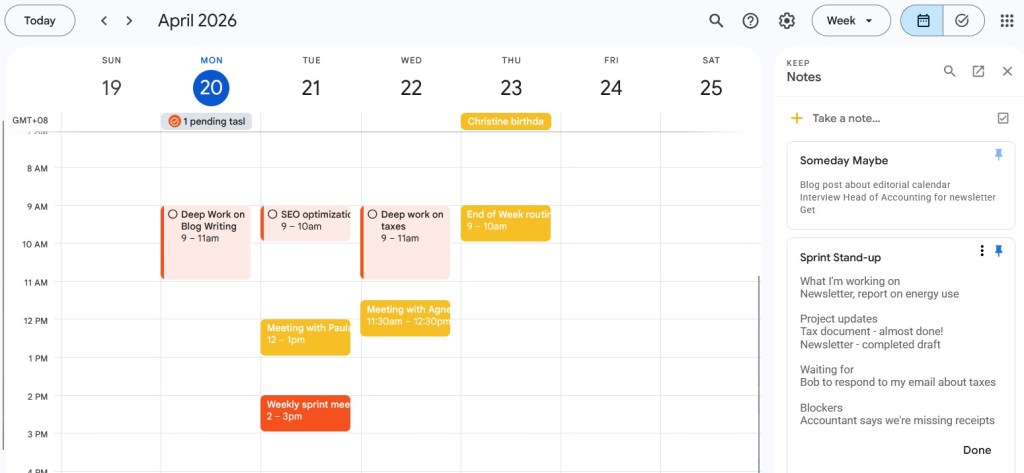
This is my favourite part of the system: I open Google Calendar. I timeblock new tasks, reschedule any tasks or appointments that I couldn’t complete the day before (or last week).
I have also baked my routines into Google Calendar so that I don’t crack my head wondering what I should do each week.
For example, my calendar has focus blocks set on certain days. It’s repeated each week. I also have blocks set for personal writing and admin stuff each week.
For my work focus blocks, I simply add, to the description, what I need to accomplish — for example, “write web page content for a service” on the Focus block each week.
Meaning, every focus block must have a goal written in the calendar.
I also have focus blocks for personal writing and chores.
By the end of my Monday reset, my calendar will have tasks for the week. Because I make sure to time block, they are often a realistic reflection of what I hope to achieve throughout the week. Priorities shift unpredictably, of course, but Google Calendar lets me reshuffle blocks and tasks easily.
Step 4: Protect My Focus Days
I have three solid focus blocks weekly: Monday, Tuesday, and Thursday.
Monday and Tuesday work best because I’m most energetic and face the fewest interruptions. Monday is my focus day for creation; Tuesday is for revision and refinement. If I need a third day, it’s usually Thursday.
I have an “up and down” cadence to my days. Some days I’m in Deep Work, intensely writing, planning or strategising. Some days are “light” in that I have meetings, do more administration tasks, stakeholder management work.
Step 5: I plan for next week
Friday is my favorite day because I plan for the next week. Yes, planning is something I look forward to each week!
And I also have a set “end of week planning” block where I review my inbox, update Jira tickets and goals, then begin the cycle again by tentatively time blocking my calendar for next week.
I avoid weekly planning on Mondays to protect my very precious focus time. By planning on Friday, I start Monday morning knowing exactly what to do — including what my Monday focus block is for.
Tip: Include your personal plans in the same system
One challenge I’ve always had was including my personal life in my planning. So, for years, I seem to do really well at work but when it comes to planning for my personal life, it’s chaos.
I cycled through many systems, from creating separate calendars to having a fully analog system just for personal life. I even tried to schedule my personal tasks in my work calendar, which felt overwhelming to manage.
My solution is to now have blocks of time, very much like my Focus times for personal activities such as personal writing (I write this blog, and another blog about Chinese dramas and a Substack about Chinese and Malaysian culture), tasks for the forum I moderate, chores and more. Like the focus blocks, they repeat every week, and if there’s one week where the block doesn’t work, I can shuffle it to another time.
Rather than schedule personal tasks in my calendar like I do with work, I leave it “free and easy”. I decide what to do in that designated hour.
I keep a separate Trello board for my forum moderation and personal writing.
So, during my personal writing time block, I’ll refer to the Trello board to see which tasks I am in the mood of doing.
As much as I dislike routines, I also realise they work immensely well so that I don’t have to crack my head, wondering what to do each day or completely forget them.


Leave a Reply