-
The key to my successful weekly planning system: Time blocking with Google Calendar and Google Tasks

I depend on this daily/weekly routine to be as productive as I can be. This is an update from a previous workflow which used Trello. Now, I use Google Tasks in tandem with Gmail and Google Calendar.
Tools I Use
- Google Calendar
- Gmail
- Google Chat
- Google Tasks
- Jira
- Trello (for personal tasks)
- Gemini and Google Workspace Studio (for AI agents)
My Step-by-Step Planning Flow
Preparation: Choose a single “inbox” for work
Previously, I was overwhelmed by notifications from too many sources: Jira, Google Chat, Gmail, verbally…The first step was choosing a single “capture” inbox: Gmail. I funneled notifications from my company’s project management system (Jira) there, but ensure I receive only work-related items and personal mentions.
Step 1: Review Google Chat (daily)
Each day, I review chat, especially the mentions tab where people mention me. Anything requiring investigation or action gets forwarded to my Gmail inbox.Step 2: Process Gmail Inbox (daily)
Once that’s done, I process my email inbox and turn relevant items into tasks using Google Tasks — just right-click and convert. I put a rough date and time for these tasks.Note: I now have an AI agent that does steps 1 and 2 for me. Every morning at 8am, Bob the Briefer (yes, I name my AI agents) compiles a report about the tasks I need to focus on and what has been happening while I slept. (I work in a multi-national company, and there’s always one branch of the company operational in any part of the world.) I read it before I start the day, but I often double check to ensure Bob didn’t miss anything. He ain’t perfect; he’s AI.
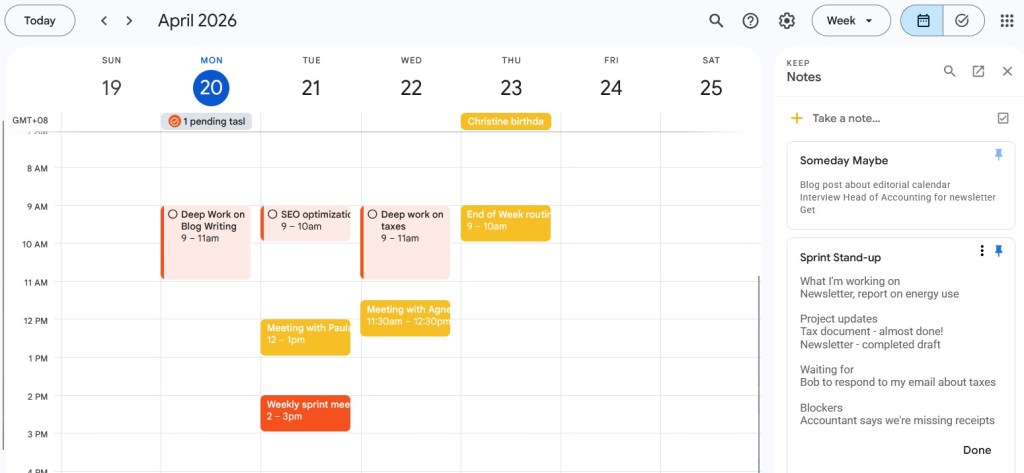
Step 3: Time Block in Google Calendar
This is my favourite part of the system: I open Google Calendar. I timeblock new tasks, reschedule any tasks or appointments that I couldn’t complete the day before (or last week).I have also baked my routines into Google Calendar so that I don’t crack my head wondering what I should do each week.
For example, my calendar has focus blocks set on certain days. It’s repeated each week. I also have blocks set for personal writing and admin stuff each week.
For my work focus blocks, I simply add, to the description, what I need to accomplish — for example, “write web page content for a service” on the Focus block each week.
Meaning, every focus block must have a goal written in the calendar.
I also have focus blocks for personal writing and chores.
By the end of my Monday reset, my calendar will have tasks for the week. Because I make sure to time block, they are often a realistic reflection of what I hope to achieve throughout the week. Priorities shift unpredictably, of course, but Google Calendar lets me reshuffle blocks and tasks easily.
Step 4: Protect My Focus Days
I have three solid focus blocks weekly: Monday, Tuesday, and Thursday.Monday and Tuesday work best because I’m most energetic and face the fewest interruptions. Monday is my focus day for creation; Tuesday is for revision and refinement. If I need a third day, it’s usually Thursday.
I have an “up and down” cadence to my days. Some days I’m in Deep Work, intensely writing, planning or strategising. Some days are “light” in that I have meetings, do more administration tasks, stakeholder management work.
Step 5: I plan for next week
Friday is my favorite day because I plan for the next week. Yes, planning is something I look forward to each week!And I also have a set “end of week planning” block where I review my inbox, update Jira tickets and goals, then begin the cycle again by tentatively time blocking my calendar for next week.
I avoid weekly planning on Mondays to protect my very precious focus time. By planning on Friday, I start Monday morning knowing exactly what to do — including what my Monday focus block is for.
Tip: Include your personal plans in the same system
One challenge I’ve always had was including my personal life in my planning. So, for years, I seem to do really well at work but when it comes to planning for my personal life, it’s chaos.I cycled through many systems, from creating separate calendars to having a fully analog system just for personal life. I even tried to schedule my personal tasks in my work calendar, which felt overwhelming to manage.
My solution is to now have blocks of time, very much like my Focus times for personal activities such as personal writing (I write this blog, and another blog about Chinese dramas and a Substack about Chinese and Malaysian culture), tasks for the forum I moderate, chores and more. Like the focus blocks, they repeat every week, and if there’s one week where the block doesn’t work, I can shuffle it to another time.
Rather than schedule personal tasks in my calendar like I do with work, I leave it “free and easy”. I decide what to do in that designated hour.
I keep a separate Trello board for my forum moderation and personal writing.
So, during my personal writing time block, I’ll refer to the Trello board to see which tasks I am in the mood of doing.
As much as I dislike routines, I also realise they work immensely well so that I don’t have to crack my head, wondering what to do each day or completely forget them.
-
Substack writers, you need a website!

“But I already have a website on Substack,” you argue.
No, no, Substack is just a distribution tool to amplify your website. It should not be your digital home.
In the last few years, I’ve noticed a pattern of writers leaving their websites to make Substack their digital home.
Now, it’s kinda okay if they have bought a domain and linked it to Substack. (Meaning, it’s better than nothing.)
Rachel from Conscious Living is a good example. This way, Substack more or less functions like a content management system (CMS) for you.
However, compared to other CMS it’s very limited, such as the ability to manage your SEO and customize your pages to add more features, but I digress. If you just want a fuss-free platform, this is one way to get it and Substack’s conditions for domains are very reasonable and cost-efficient. As I will explain later, this could change on a dime without warning.
However, there are some writers who are saying: “Hey readers, I’m now writing on Substack, so head on over there (and ignore my website)!”
Some writers do have a website, but link to their Substacks, calling them their “blogs”. If your Substack has a domain name they own, it’s okay, but if it’s xx.substack.com, Substack is saying “All your content are belong to us”.
In conclusion: Writers, don’t do this. It’s short-sighted and unwise and can derail your long-term visibility on the Internet.
The siren call of convenience
Every few years, the internet convinces writers that a new digital paradise has arrived. First, it was social media like Facebook. Then blogging networks like Tumblr. Then it was Medium. More recently, it’s been Substack.
Platforms promise us an eager audience, built-in monetization, a smooth user interface, and a supportive community. As a writer who just wants to focus on writing, it’s incredibly tempting to hand over the keys to our creative kingdoms and let these portals handle everything. (Believe me, I gave in at one point. For years, I just stopped blogging altogether and even gave up a domain that had high traffic! But I got back in 2012 and never left.)
However, this is the truth that has not changed since the dawn of the Internet: When you build your audience entirely on someone else’s platform, you aren’t a homeowner. You are a tenant. Or worse, a digital sharecropper.
And corporate landlords always change the rules eventually. It’s not personal, it’s just business.
The illusion of the safe space
It’s easy to feel secure when a platform is in its golden era. But we’ve watched the downfalls of Twitter, the policy shifts of Reddit, and the changing tides of algorithmic networks. Relying blindly on a centralized portal not owned by you means your life’s work can alter overnight based entirely on a corporate boardroom decision.
When I looked at how fragile our digital ecosystems really are, I realized I needed a space that wouldn’t go “poof” because a company needed to please its investors or shareholders. This realization completely changed my approach, pushing me to protect my content by learning to blog the IndieWeb way.
Your writing needs a permanent homebase—a domain that you own and control. Full stop.
Moving from “renting” to syndicating

Do you own the land you plant your “content” crops? The biggest pushback I hear from writers is: “But my website doesn’t have an audience! Substack does.”
But you don’t have to completely abandon social media or platforms like Substack to protect your autonomy (personally, I prefer the word sovereignty but it does sound a tad dramatic).
You just need to change the order of operations. Instead of publishing directly to a portal, you can shift your mindset to POSSE: Publish (on your) Own Site, Syndicate Elsewhere. (I explain the POSSE/PESOS method in an older post.)
By treating your website as the definitive source of truth and using platforms simply as distribution pipes, you get the best of both worlds. I dug deep into this shift when I committed to being an imperfect gardener of my digital garden, exploring how a less market-y way of presenting my content online let me share my wild garden of thoughts without dancing to the algorithm.
A reality check on platform hype
If you are still holding out hope that Substack is “different” from the social platforms that came before it, let’s look at the numbers and behaviors behind the marketing copy.
After spending a significant amount of time observing the platform ecosystem firsthand, I wrote a brutally honest takeaway in What I learned from one year of Substack. The network effects are real, but so is the pressure to conform to what the platform’s ecosystem favors.
This post, by the way, desperately needs to be updated because things have gotten much, much worse since I wrote it.
When you hand your content over to a platform, you have to conform to their rules and their localized biases. For those of us writing from outside the dominant US-centric echo chambers, platform algorithms heavily prioritize specific western narratives, making it incredibly tough for localized or minority voices to be seen unless they conform.
I wrote about this exact frustration recently in Linkblog: Dwelling on the Internet, highlighting how algorithmic complacency forces us into homogenized bubbles.
The flip side – the writers who refused to leave their websites
Each time there’s a new drama on some platform, and writers are shaking their sabers and declaring that they will leave for yet another social media platform they don’t control, I think about writers like John Scalzi.
As of date, John scalzi has been blogging on https://whatever.scalzi.com/ for 28 years!
This sci-fi novelist has maintained a single independent website continuously for nearly three decades; this makes him one of the longest-running, most consistent original bloggers on the internet. Imagine the amount of digital footprint on that website! Unbroken by time or platforms.
(Specifically, he uses wordpress.com like I do, as we both don’t want to bother with the pain of setting up your own self-hosted wordpress website and just want the folks at Automattic to do it.)
He blogs in the classic Indieweb way, though I doubt he is even aware he’s doing it. He treats his social media channels such as X or Bluesky as a way to amplify his website. All roads lead back to https://whatever.scalzi.com/, and this is something I wish every single writer would do.
He wrote recently in Various & Sundry, 6/3/26:
this site acts as my own institutional memory, if I post something about it here it constitutes an official record. I mean, all the posts I ever placed on the former Twitter are now entirely lost to time, since I have gone in and purged my entire timeline there. This site, however, endures. – John Scalzi
Breaking free from platform blues
Trying to adapt your presence across various platforms in an ever-shifting digital landscape is exhausting. One minute a platform is a writer’s darling; the next, it’s being boycotted. Railing against a platform’s focus shift or the presence of (long sigh) Nazis is a useless endeavor.
As I noted in Linkblog March 12, 2026: Platform blues, chasing platform purity is an illusion. Tech will change, corporate algorithms will continue to prioritize profit over human connection, and platforms will continue to cycle through hype and decline.
The antidote to this exhaustion isn’t moving to the next shiny new app. It’s anchoring your work on an independent website with open distribution channels like RSS. It also means ruthlessly using platforms as distribution channels. When one collapses or you prefer to just move, it’s easy to just change strategies because your digital home remains unchanged.
Use platforms to find your readers, but bring them back to your house. It’s time to stop digital sharecropping on rented land.
-
Linkblog: Dwelling on the Internet

Welcome to my Linkblog where I share interesting articles and blog posts I found about social media, Indieweb, geopolitics, Chinese and Malaysian stuff, cute cat videos or anything funny and interesting I find online.
FYI: I also share links in the “Weekend Tales” of my Substack newsletter, Tai Tales. The newsletter is geared towards Chinese and Malaysian culture.
Being on the Internet
David’s article really resonated with me because I’ve been thinking for a long while now to create a newsletter (or three) to surface barely heard voices.
On Substack, for example, the voices I hear are overwhelmingly from the United States, and it is incredibly hard to find voices from Asia and South-East Asia. It’s a source of huge frustration for me because the most common narratives about my part of the world is from the United States, and a lot of times these narratives are distorted, skewed to American values and is not what is really happening in my region.
Yet, when I try to speak up on Substack, I get harassed as I’m a minority voice talking about an uncommon and often demonised narrative. On top of that, my posts never get seen as the algorithm is prioritising US voices and Substacks. Worse, they are also boosting only popular ones, which means the most popular narrative is the loudest.
I have occasionally shared links to South-East Asian Substacks and blogs, and each time I do, I get messages of gratitude. However, I still wondered if my tiny act of rebellion would do anything to move the needle in terms of being heard in an English-speaking Internet overwhelmed by Western voices and narratives.
David’s post reminded me that yes, I should put in some effort to help surface more unknown corners of the Internet. Maybe we won’t get rid of the algorithmic complacency sweeping society now, but at least we’ll do some tiny thing to help create a messy but human algorithm instead.
Being a Mastodon Moderator by Mark Wyner
As a Reddit moderator, I already know the answer to this article would be – it’s not easy 😉
Algorithms are breaking how we think (video)
This video made me realise I am a strange person. I actually don’t like algorithms feeding me information but actually do this shocking thing called research.
Yes, I hate algorithms with a passion and do not depend on them for my news or information sources.
I realised that “algorithmic complacency” was real during the US folks migration to xiaohongshu (Red Note). I was puzzled why so many seem surprised that China was well developed and futuristic… Then I noticed a pattern – most comments from US folks say that the algorithm didn’t show them this China. Which, of course, led me to think – then, use search? But I realized nobody was interested in doing that extra work.
Our modern society is nothing but a delicate house of cards.
A story from Vladimir Campos on Medium ‘Why are we increasingly relying on the cloud for everything? Why do all things have to have an app that has to be connected to the Internet to work?’ Read ‘Our modern society is nothing but a delicate house of cards.’ by Vladimir Campos on Medium: “
How have my blogging habits changed? – The Wallflower Digest
“I really enjoyed this post by Alice about how her blogging habits have changed, and especially the part about she no longer microblogs. It’s such a habit of mine to post directly to Mastodon when I can just post on my blog … I am working on adjusting my workflow for social media publishing so that I write a note in my Obsidian vault first before sharing it to the web. I’m working on it, but I’m not sure how successful I’ll be. Old habits die hard!
-
Why the global south is grateful for Deepseek

Deepseek is pretty amazing. I made 22 API calls yesterday and I have spent….$0.005. Granted my use case is extremely simple, just some simple data work, extracting and shuffling data from a csv file to create a directory page on a website. But what would’ve taken me 2x longer copy and pasting, with lots of context switching that would’ve taxed my limited cognitive battery cells, took me only less than 10 minutes. If I had mastered using a coding agent like Hermes or Antigravity, I probably would’ve asked the AI to publish it on my Substack with a few lines. (But I’m a control freak, so probably will never do this unless I’m extremely confident it won’t run away from me and commit some kind of move that would tank my socials. But I digress.)
Besides the data work, I was also having an interview style conversation with Deepseek, using my answers to write a post for a drama discussion. The post was super off in terms of tone, but I was happy to use it as a first draft to polish. Before using Deepseek, I used Mistral’s Le Chat for this and was clocked out after a few rounds with it.
Each time I think about the Deepseek Moment, when the company announcing its open source and extremely cost-effective nature on the Internet, I remember it being one of the happiest times online (for me, the ever present nerd.)
Back then, I was reluctant to pay for ChatGPT and wondered how folks from my region and other poorer Global South countries could ever catch up with US citizens. I was also feeling a tad bitter that again, high tech is gated from us thanks to everything being denominated US dollars.
The Deepseek moment was a very happy moment due to this. Finally we can have access to affordable, equivalent AI tech. So, as the Anglophile world (I really hate the word, but what can we call Westerners?) wring their hands over ethics, morals and diminished human cognition, the global south ignores them because we’re too busy keeping pace and trying to learn as fast as we can. Having US dominate AI for a year or two was a slightly scary experience, especially when prices were starting to creep up. Deepseek was a “now this is our chance, let’s hurry up” moment.
We learned from history, the price of being behind technologically. It’s almost existential for us.
Note: I’ve retired my Le Chat subscription and am now on using the platform’s free plan and using the API pay-per-use on Typing Mind)
-
Of abandoning mother tongues and shame

ℹ️ Now, a caveat before I go on. There’s a common narrative on left-leaning US-dominated social media that there’s a concerted effort by Beijing to stamp out native languages. This interpretation is false and propaganda, and this writer is not in the mood to educate or argue with these believers right now, and as I don’t want this thread to be hijacked by an agenda, I’ll be moderating the comments.
This will be my only attempt at educating people on the subject: Even in Malaysia, Chinese dialects are fading, being replaced by Mandarin. There’s no concerted effort by the Malaysian government to stamp out Chinese dialects. This is all due to the power of peer and family pressure. Self-inflicted, almost. Kids feel pressured to adopt the perceived “elite language” at school or even at home. And if parents do not make a concerted effort to educate their children in the native tongue, it’ll fade.
It happened in my family, with my siblings being total bananas, preferring to communicate most of the time in English while I am can converse in Hokkien (a Chinese language dominant in China’s Fujian province) and Mandarin. This was a choice on my part to keep learning Mandarin and speaking in Hokkien. My siblings just didn’t think it a priority, that’s all. It’s no biggie. It’s just a personal choice every individual in Malaysia may make. Now on to the essay.
Yaqi Li’s essay, Reversed Tones and Borrowed Tongues fascinated me because, as a Malaysian, I grew up in an environment where we end up using multiple languages.
I thought long and hard about whether I was ever ashamed speaking Hokkien, and the short answer is, No.
In fact, I’d be surprised if any Malaysian-Chinese would feel ashamed speaking their native tongue. For as long as I lived, the Malaysian Chinese community had been fiercely determined to preserve their traditions, and that included speaking their native tongues. If anything, they’d frown at anyone who look down on their mother tongue.
The pressure and “shame” I feel is that I was never fast or smart enough to master more languages. For example, having lived in Kuala Lumpur for most of my life, I am often side-eyed for not bothering to learn Cantonese.
Malaysia’s unique education system—we have schools whose primary languages are either English (private schools), Malay (national schools), Chinese or Indian (vernacular schools)—meant that there’s no one Malaysian with the same command of language in any language.
My strongest language is English despite being in a Malay-dominated national school because my family are Penang Peranakans who are Anglophiles. Even before Malaysia’s independence, the Penang Peranakans spoke English and sent our kids to missionary schools.
At home, my parents and I speak a mixture of English and Hokkien. Among my siblings, I’m the most fluent in Hokkien and Mandarin. Mandarin was a ‘chance of geography’. I grew up in Johor, but unlike my siblings, I just naturally learned Mandarin while they didn’t.
The Peranakans are Chinese, but we don’t really feel inferior or ashamed for not speaking Mandarin or our native mother tongue because it’s understood that most of us can’t. The Malacca Peranakans, for example, mostly speak Malay.
One of the excuses I give when a Chinese-educated Malaysian-Chinese scoff at me for not speaking Mandarin fluently is that I am Peranakan. A look of understanding will dawn on their faces and they will say, “Oh no wonder.”
They’re not as forgiving for complete Chinese bananas, however. They just cannot comprehend Chinese people who do not bother preserving their mother tongues.
We also don’t feel any shame/superiority/inferiority for learning a language. When you are a Peranakan, whose culture is a blend of myriad cultures including Chinese, Malay, Thai and even British, there’s really little shame in learning a language. As I said, if anything, our shame comes from not learning more languages than we should!
I’m an odd duck in that I have really good accents in my languages (great Malay and Mandarin accents) but my vocabulary sucks. My accent makes up for it, fooling many native speakers into thinking I’m native like them.
So, in summary, Malaysians generally don’t really have an identity crisis over our mastery of language. However, language is politicized, with Malay trying to maintain its primacy in an English-dominated world, made even more complicated by a language-fractured education system and a population whose mastery of Malay isn’t standard or homogeneous.
But I hear that among the Chinese educated, they do feel bad if they can’t master English. But again, only because they are supposed to. They understand how important it is to master English and their mastery of it will determine their success in business.
But again, when most of Malaysian society is multilingual, able to switch to multiple languages (sometimes in one sentence), the shame comes from not mastering a language fast enough or adding more languages to your skillset.
#languages #Chinese #Culture #Mandarin #Hokkien #Malaysia
-
Writing with AI isn’t always generating entire novels with a prompt

Sometimes, I get frustrated with the writing community. I’ll casually post something about using AI for writing, and almost immediately, someone would drop a rude comment without finding out how I use AI to write!
They immediately jump to conclusions and think I generate novels with a click of a few buttons.
Yes, unfortunately there are some writers who do that.
Personally, I feel that generating 200 novels a year – even if you write fast before the age of AI – is not sustainable for the environment or for the mental health of the creator. I also highly doubt this method could produce something highly unique or impactful. I’m pretty sure very talented writers can, but they most probably cannot generate more than a dozen highly unique works a year.
However, in the world of genre fiction, this factory line use of AI can work because some readers just like to read the same story, tropes, and plots as long as there’s enough variety to the plot or characters to keep them happy. (Let’s face it, we know readers like these exist and I even read these novels for relax sometimes.)
In the world of content engineering (which is what I actually do at work these days), these stories are said to have a specific content model which can be fed to LLMs to generate stories very quickly.
These stories serve a very hungry market. Readers of these types of novels read so fast writers can’t produce enough books for them. The writers perform a service whether you like it or not.
AI as a ghost writer?
As a reader and a writer of fiction and non-fiction, I personally do not agree with this way of using AI for writing because it reminds me too much of factory production.
I generally do not find the process of writing books like this fun at all. Nor do I generally read these type of books in volume; I like books that have a deeper meaning, and I definitely love books with beautiful prose.
However, I do not condemn nor heckle the writers who write novels this way, because it still takes a certain amount of effort and creativity to do this, and they serve a market that I don’t write for. Far be it for me to wag my finger at other writers whose process I don’t jive with.
These writers are essentially treating AI like ghost writers. In real life, many writers (James Patterson, anyone?) use ghost writers. Is it wrong to use ghost writers, human or AI? Well, I personally don’t think it’s wrong; it’ll be hypocritical of me to say so because I’ve ghostwritten for clients before.
It’s just business. That’s the cold, hard fact, so why get delicate about this.
These writers will find readers who will appreciate them.
You, who prefer not to write with AI, will find readers who will love you for this very fact.
And I, a writer who uses AI to assist me, will also find the readers who will appreciate me.
Basically, we are not competing for the same pool of readers, so why squabble as if there’s a limited pool of readers out there?
Using AI to write fiction looks different for everyone
Not ALL of us write like this. I certainly do NOT.
For one, I love crafting sentences. It’s a fun challenge for me. I especially like writing prose that makes people laugh and I like my romantic scenes subtle and filled with nuance. AI is never going to take that away from me, nor is it able to produce the kind of fiction I like to write.
Here’s how I use AI to write fiction and non-fiction:
For fiction, I generally use AI to bust my creative blocks or when I’m especially brain fog-gy. I write most of my prose, but I use this method when I’m especially blocked and can’t write a word:
- I create an agent that helps me write story beats for me by having a dialogue with me. I give it my current story beats for a scene, and then we have a long dialogue where it asks me questions. My replies will improve the depth of the story beats. Then, I use these story beats to generate a first draft.
- This first draft acts more like swipe files for me. If you work in the content profession, especially in advertising, you’d know that swipe files have been kept by writers for decades. I use to grab novels off my shelf and read it when I feel “dry” and need inspiration to write my prose. It’s usually a frustrating experience as it doesn’t fit what I need. (Swipe files for ad copy is much easier, due to the shorter lengths.) Now, I have a highly targeted swipe file that suits my scenario or the scene I want to write.
- I then rewrite the first draft extensively.
For non-fiction, I get very technical. I use a lot of content engineering principles. Content models. Schemas. Things like that, but here’s one favourite way – I usually use this for more casual internal blogs:
- I create an agent which will dialogue with me.
- I will go for a walk and just talk into an app that transcribes what I say.
- I activate the agent, feed it the transcript and it’ll dialogue with me, asking me a series of questions so I can clarify my thoughts.
- At the end of it, it’ll generate a post – I’ve created “guardrails” for it so that it will use up to 80% of the words in the transcript.
As you can see, I’m heavily involved in this process. My ideas. My words. AI is there to help me clarify my thoughts.
I also have an agent that critiques my work; I designed it so that it is a firm mentor who is hell bent on making me a better content engineer and writer. (I once asked it to generate an image of a website menu that we were working on together, and it responded with: “I’m your mentor. I don’t generate images for you. I tell you how to improve.”
I designed it a tad too well, I think hah!
So, you can see that there are so many amazing ways that writers can use AI with their writing.
AI use cases for writing are extremely diverse and exciting. It’s all about automating the parts you do not like and find tedious. (My favourite use case is transcribing my thoughts! I am very much a “talk it out” person, and writing blogs by talking it out has sped me up considerably.)
I wish more would be more open to the possibilities and expose themselves to AI use, experiment and stop hiding their heads in the sand. And if they do, stop attacking those who are, because that’s not going to stop writers like us from honing our skills further, so it’s pretty much a useless exercise.
Whinging about what “AI is doing to writers” and leaning into AI doomerism is about one of the most useless things to do with your keyboard now. I’m not saying that you should go to the extreme end and be an AI evangelist.
Instead of whinging and attacking other writers, it’s far more productive to:
- Start experimenting with AI and writing and automate the things you find tedious
- Lean in even more into your craft, and be the next Sun Tzu or Margaret Atwood
- Find a way to help readers to find the writers they’ll love. If there’s one damage that is being made to the writing world, is that the book world is getting insanely noisy due to the deluge of books being created. Obviously, the old ways of finding books to read isn’t working any more. We need to find a new way.
-
Why I use Mistral as my personal paid AI service

My choice of paid AI is probably strange to most … besides Gemini, which is assigned to me at work (meaning, work pays for it), I’m personally paying for … Mistral. Mistral is seen as Europe’s leading AI service alternative to US services.
You’d think I’d go for Claude, and it IS tempting, as I do admire their workflows, and how they package their setup. (Skills, and Claude Code is quite a banger.)
But Claude was a snooty bitch when I tried to sign up with my personal email (verification codes never came), and its token limits were annoying. And then, admittedly, I hate its leaderships’ constant sabre rattling against China, fear-mongering ways and callous disregard for humanity’s safety. Anthropic seems driven by greed, so the thought of supporting it financially annoyed me a little bit. So, I suppose being sniffed at by Claude was a good thing.
To clarify, I didn’t choose Mistral because I have an anti-US-AI streak. I’m too pragmatic for that. I still use the free versions for all US AI models. Mostly for research.
I went for Mistral because I didn’t need to do wild stuff with my AI, not because it was a “purer” company than US-based ones. It just doesn’t do as many reckless things.
I hope.
Funnily enough, one of Mistral’s unique selling points is that it is not a US based company lmao.
But a reminder: most AI companies are just driven by a drive to succeed, either to get more money or to get more power, so it’s something we have to soberly accept if we throw money at them.
I really don’t need my LLMs/AI to be bleeding edge frontier stuff
Most of the time I rely on open source AI such as Deepseek (which has recently upped its game with v4, which doesn’t rely on Nvidia chips – a seismic game changer.
My AI colleagues do simple stuff like translate from Mandarin to English to help me learn (Deepseek), clean up transcripts (Qwen), do simple grammar edits (Qwen) and help me organize my thoughts for my personal writing projects (Mistral, Qwen, Deepseek).
As you can see, I use the AI mostly for writing, but still retain full control of my writing.
My primary method is dictation as I write 4x faster that way. (I use Otter or Windows’ Windows+H command to dictate.)
I tell AI to use up to 90% of my original words and then clean it up. I will then revise it further, adding more flair and finesse. Occasionally, when I’m especially brain dead, I’d ask it to help me improve the flow by suggesting how to move around pieces of my transcript to a coherent narrative.
I don’t need to fully automate my life: I’ve already built simple agents with Gemini at work. It automates some of my workflows but it’s nothing fancy in the world of agentic AI.
Another reason why I chose Mistral
It’s not a prude.
Yes, sometimes I do write fiction with a spicy edge, and there’s nothing more annoying than an AI clutching its pearls and muttering at you, “How dare you besmirch my chips with your filth!”
ChatGPT, Claude, Deepseek, Qwen, Gemini – all of them are prudish, and would seize up the moment you talk about body parts. It would throw out your uploads that have some spicy scenes and turn away like a delicate miss, saying that my content is forbidden.
Well, eff that.
Sure, there are workarounds to make these models do stuff, and there’s a way to nerf them too. But why go through all that trouble when Mistral, like the French, don’t hyperventilate when you talk about sexy matters.
For me, the future may not be Mistral
As convenient as Mistral is, eventually, I hope to build my own Open Source AI system locally. Because that’s the way to go. Also I’m rebellious that way; I hate being beholden, gatekeeped or walled-in by any company with fuzzy morals. However, right now I just don’t have time to learn the ropes to climb the very steep mountain to get there.
I don’t know, I guess I’m a rebel like that. Hate sending money to hype machines even if the hype is half deserved.
What AI service do you pay for? And if you use open sourced stuff, what do you use?
-
Reading Pu Songling’s “The Haunted House”
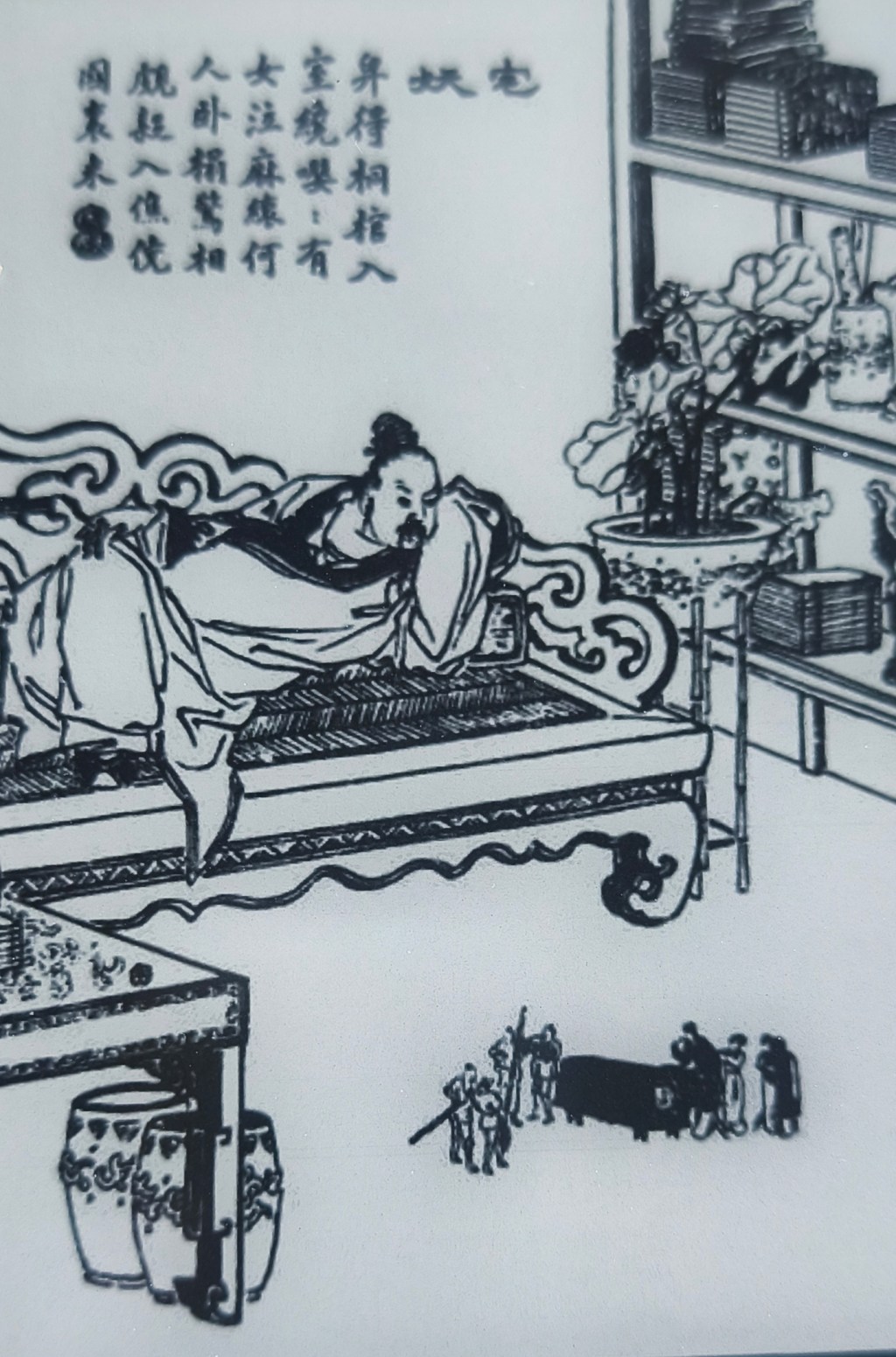
I created an LLM ‘literature professor’ who discusses stories with me after I finish a tale from Pu Songling’s Strange Tales from a Chinese Studio (or Tales of the Liaozhai), using the 2006 Penguin translation by John Minford.
As I read through the book, one of the most important things I learned about Tales was that it is not just a series of funny, scary stories, but Pu Songling’s commentary on life under Qing Dynasty rule.
About “Liaozhai”
The series of short stories, written during the early years of the Qing Dynasty (mid-to-late 17th century) in China, may seem like horror stories. However, they are actually reflections from a frustrated scholar who, in his lifetime, was denied entry into officialdom despite his scholarly abilities.
“Liaozhai” is Pu’s “studio name” or penname. Liao Zhai basically means “The Studio of Idle Chats”, which suggested that his stories were merely “gossip” or “casual tales” told among friends, not serious historical records or high-minded literature.
However, this was ironic. He may call them “idle chats” but his stories were often sharp, sophisticated social critiques disguised as ghost stories.
Anyway, after I upload my story notes, the Qwen ‘Liaozhai professor’ will ask me a series of questions using the Socratic method to help me think more critically about the story beyond ‘oh, that was interesting’. It also provides me with the historical context of the times.
The Haunted House
The story that I read for this post is The Haunted House (Chapter 11).
The Haunted House was a curious story: a man owned a strange house. Sometimes, the furniture of a room manifested scary behaviours – its texture felt like flesh, and some pieces could literally slither away.
Towards the end, one of his tenants wakes up to a strange sight: he sees little people in his room. This terrifies him. The story ends with him trying to run out of the room, only to fall flat on his face.
Hearing the commotion, the household runs to his room, but they see nothing out of the ordinary.
One of the most interesting aspects of the narrative style of Strange Tales from a Chinese Studio is that it demands you be comfortable with ambiguity. Readers accustomed to Western storytelling styles, where stories end with some form of closure, would probably feel discombobulated. Like them, I naturally asked, at first, ‘What the heck was the point of this story?’
A story about living under injustice
As I had the conversation with Qwen (the LLM asked me questions, did not feed me answers, and I came to many of the conclusions on my own), I realised that the entire room and house were an allegory for the Qing Dynasty’s justice system and bureaucracy.
The furniture’s texture being like ‘flesh’, and the owner’s disgust after touching it, mirrored the revulsion the author felt towards institutional ‘instruments’ acting in a way that was alien and illogical.
The horrified reaction of the tenant to the tiny, crying figures represented petitioners lost in an inscrutable system; their unexplained grief mirrors how bureaucracy absorbs suffering without redress. The tenant’s terrified reaction probably reflects the scale of the horror this system perpetuates on normal people, and despite his attempts to flee the clutches of this room, he falls on his face. And even when people come to his “rescue” they end up thinking, “what is he on about?” because they don’t see what he sees.
Chinese storytelling traditions
As you can see, Strange Tales from a Chinese Studio demands that you read the stories not at face value, but to see the meanings behind the ‘horror’.
It is written in the style of the zhiguai tradition, where strangeness is documented, not solved. (Ambiguous endings are a feature of the narrative style.) Zhiguai stories are treated like ‘historical documents’; each entry is short, about 500 words.
I also learned that Pu Songling blended zhiguai’s ambiguity with chuanqi’s emotional depth.
According to Qwen/Britannica: “Chuanqi (傳奇, ‘transmissions of the marvelous’) emerged in the Tang Dynasty (618–907 CE) as China’s first mature form of fictional short story in classical Chinese. Unlike zhiguai’s brief, documentary-style records of strangeness, chuanqi developed fuller narratives with psychological depth, character arcs, and often romantic or adventure plots – written with literary elegance rather than historiographic restraint.”
Learning about these narrative traditions was fascinating! However, I lamented to myself that since Western media and storytelling have proliferated throughout the world and become dominant, we are often told what’s the “right” storytelling structure.
The three-part narrative, the “Save the Cat” story structure etc, isn’t universal after all. Doesn’t that mean that those of us reading and writing in English are currently limited to one form of structural storytelling?
Many Western storytellers or writers often tout the ‘right structure’ or a ‘template for storytelling’, and I wonder if we are really losing out on something. Are we being limited in some way, forced to adopt a style – a form of imperialism of storytelling culture?
To this, Qwen, or rather, the Liaozhai (the Chinese name for Strange Tales) professor, reminded me: not all Western traditions demand closure (e.g. Kafka’s unresolved nightmares).
A haunting’s deeper meaning
In the end, The Haunted House’s message is this: ‘The instruments of justice are not behaving as they should.’
Pu was not just telling a ghost story; he was documenting how power feels when it violates its own logic.
During the Qing Dynasty, bureaucracy often felt endless and aimless, and for the people trapped in it, trying to get answers or resolve their grievances, it was an endless room of horrors they could not escape.
The ambiguity of the story is the message.
Fun fact: Some of the tales from Strange Tales have been made into blockbuster movies. Here’s a very popular one: A Chinese Ghost Story, starring Leslie Cheung:
-
March 2026: What I’m doing now

Realised I’ve not updated my “now” status in a long, long while.
Right now, geographically, I’m in Penang, the island where I was born. My ancestors have been here for more than a century. Sometimes I feel that the island calls to my blood – at the risk of sounding dramatic.
At this exact moment, I’m typing this at a quiet bookstore cafe where they serve Chinese tea and Chinese books.
A most zen place to work.
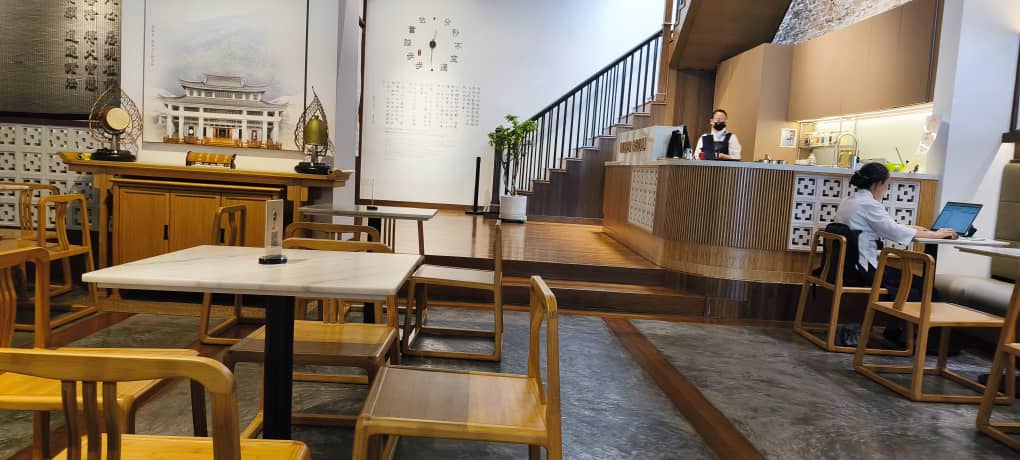
Jing Si bookstore & cafe in Georgetown, Penang. What I’m learning
I feel behind in terms of AI, but I’m taking Anthropic’s Claude Code In Action course. I may be learning Clawbot from a friend, but let’s see how it goes – I think it’s overkill for a normie like me and I don’t feel like I have many use cases for it as I like to be in control of my writing most of the time.
What I’m writing
I’m quite behind with my personal writing as work has been really intense lately. I tend to write in bulk and spurts. I recently cleared about a dozen reviews for my Chinese drama blog, Dramatea. Speaking of which, I’ve been at it for two years. It’s about time I make it official, bite the bullet and buy a domain name for it.
Likewise for this website, I have a huge stockpile to clear and schedule for the blog.
I’m trying to implement a more Posse vs Pesos approach to this blog. It’s just too easy to digital sharecrop for platforms because they make it so very easy. The worse part of it is when I PESOS, I often forget to return the content back to my website where it should rightfully belong.
I’m also sharing more links via my linkblog section, at least twice a month. I feel that with AI on the ascent and search becoming murkier than ever, surfacing only the select who know what to do to get their content seen by LLMs, human recommendations are more important ever.
Where I am, career-wise
Still at my company, ServiceRocket. Designing Content Strategy and writing about AI, cloud migrations, enterprise planning and systems. As a planning nerd, I find it fascinating, but I do miss working directly with product teams.
Habits I’m trying to form
- Strength training is more important now at my age, so I’m doing 2x bodyweight exercises per week. I don’t really like to rely on gyms; I just prefer the outdoors.
- In the same vein, I’ve been taking more walks in the park these days and thankful that I live very near one.
- Walking after meals is super healthy for you and I’m trying to implement that for every meal, especially dinner time, if possible.
News that is taking my bandwidth now
Try as I might, I find it difficult to tear my eyes away from the US-Israel-Iran war. I just find it difficult to comprehend the level of lawlessness, barbarity, injustice I’m forced to read about daily. The “heroic” nation of the US is no longer heroic in my eyes. (Though to be honest, it has been decades since it appeared that way to me.)
I used to think of the US as a flawed democracy, but now I can’t help but think of it as a fallen democracy, a rogue state.
I’m refraining, to the best of my ability, from writing about it, however. The world doesn’t need more rants about the war. I also don’t like attracting too much unnecessary attention to myself.
-
Linkblog March 26, 2026: On typing

Welcome to my Linkblog where I share interesting articles and blog posts I found about social media, Indieweb, geopolitics, Chinese and Malaysian stuff, cute cat videos or anything funny and interesting I find online.
FYI: I also share links in the “Weekend Tales” of my Substack newsletter, Tai Tales. The newsletter is geared towards Chinese and Malaysian culture.
PS: I felt it was appropriate for this issue to use AI-generated imagery 😉
Nostalgia for word processors
The Digital Dilemma: Why Writers Are Abandoning Modern Word Processing Software
“Modern word processors, like most contemporary internet spaces, have become battlegrounds for our attention.”
I long for the days when a word processor was just a blinking green thing on a black screen 🥲
Your Word processor is distracting you
Each time I use a web-based word processor, my blood pressure just goes up. These days you never get a peaceful moment when you’re writing on one of those. You get interruptions galore – hey, would you like a tour? Hey! Did you know about this feature? HEY! WE GOT AI NOW
That’s why I write with Obsidian these days. So peaceful. No bloody interruptions. I use it to write almost everything. Blog posts, work copy, fiction, newsletters.
Turning Obsidian into the ultimate writing app and
How to Use Obsidian for Writing and Productivity
Speaking of which, this is how you use Obsidian for writing.
Malaysia
We Malaysians sure love our malls. It’s our community centre, place of work … some malls even have condos above it!
Geopolitics
The three reasons why Americans aren’t rising up in open revolt
It’s kinda depressing this video was released 12 years ago. At what point is “enough is enough”? 😅
Does AI “Threaten to Undermine Democracy” or is it already way too Broken?
The intersection of tech and politics! I love the channel, Internet of Bugs, and this is such a solid take.
-
Subscribe
Subscribed
Have a WordPress.com account? Log in now.

